
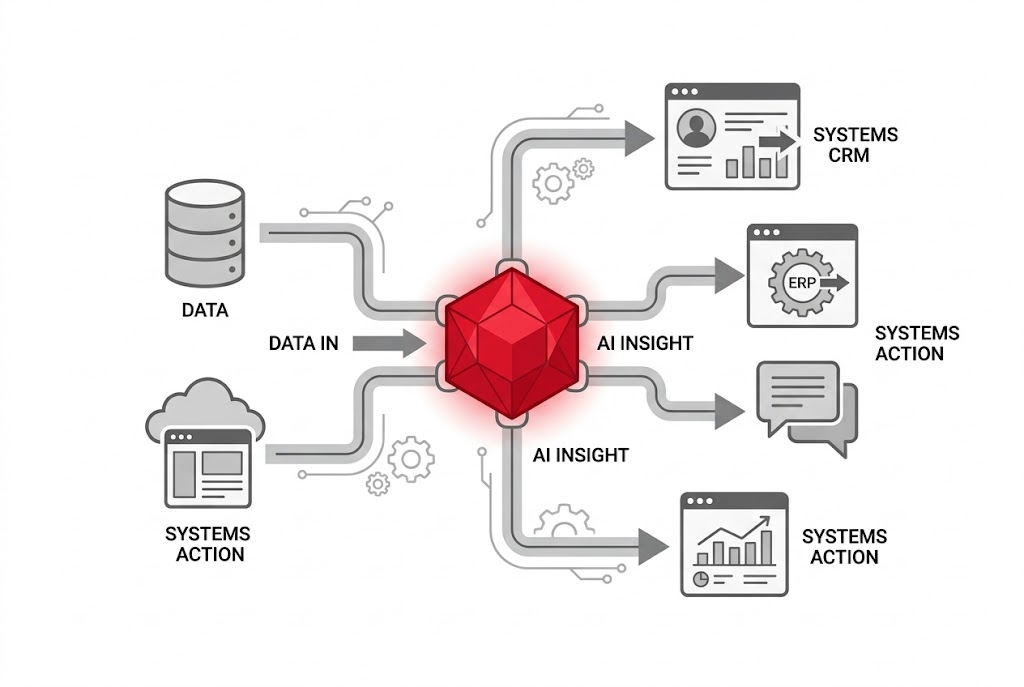
“RAG: Teaching AI to Know Your Business” covered how to ground a language model in your own knowledge, so it stops guessing and starts answering from what your business actually knows. That solves a real problem. It does not solve a second, closely related one: knowing something and being able to act on it are not the same capability.
A RAG-grounded assistant can tell you what your return policy says. It cannot update the ticket, book the follow-up call, or move the deal to the next stage in your CRM. It is, in the language of that post, still consultative. Reading is not the same as doing, and most of the value businesses actually want from AI sits on the doing side.
Why it matters: Model Context Protocol, or MCP, is the standard that lets an AI assistant go from knowing about your business to acting inside it, safely, and without a custom integration for every single tool you use.
| Misunderstanding | Reality |
|---|---|
| A RAG-grounded assistant can already take action on what it knows | RAG is read-only by design, retrieval and generation, not execution. Acting on a live system needs a different kind of connection entirely |
| Connecting AI to a business tool means writing a custom integration | MCP standardises the connection once, per tool, reusable by any compliant AI client, not rebuilt for every AI product you happen to use |
A Problem I Built My Way Into
Before I properly understood why MCP exists, I built around it by hand. A small-business assessment tool I built (more on that build in “Building an AI Solution Advisor: From Concept to Production”) needed three outside connections: a way to actually send the completed report by email, a place to save results beyond a single browser, and a way to notify a channel whenever someone submitted the form.
Each of those needed its own service, its own credential, and its own glue code. The email integration knew nothing about the database integration. The database integration knew nothing about the notification. Three services, three one-off cables, none of it reusable for the next connection I would inevitably need.
That is the pattern MCP exists to end. Every AI product for most of 2023 and 2024 solved external connections the way I just did: bespoke, one at a time. The industry shorthand for the resulting mess is an M-by-N problem, M different tools, each needing to be wired up separately to N different AI systems, with none of that wiring reusable across the other. MCP replaces the custom cable with one standard connector.
Had MCP been the natural choice at the time, the shape of that work would have looked different. Instead of three separate credentials and three separate request formats to learn, each service would have exposed itself through the same protocol, and the only genuinely new work would have been the specific business logic, what to say in the email, which fields to save, what the notification should read, not the plumbing underneath it.

The Simplest Way To Think About It
MCP is often described as a USB-C port for AI. Before USB-C, every device needed its own proprietary cable. After it, one standard connector works across phones, laptops, and monitors from completely different manufacturers. MCP does the same job for AI: instead of a proprietary integration per tool, one open standard lets any compliant AI application talk to any compliant external system.
The protocol defines three roles, and understanding them is enough to reason about how any MCP-connected system behaves, even without touching the underlying code.

The host is the application you are actually talking to, Claude Desktop, Claude Code, or another AI product built on the protocol. The client lives inside the host and is scoped to exactly one outside connection, it handles the handshake and nothing more. The server is the specialist on the other end, a small, purpose-built program that knows one system, your calendar, your files, your project tracker, and exposes what it can do in a standard way the client understands without custom instructions.
Tracing one real request through this makes the roles concrete. You ask the host to check whether tomorrow's calendar has room for a client call. The host's model decides it needs the calendar server's help and asks the relevant client to find out what tools that server offers. The client asks the server, gets back a short list, calling one of them, something like check availability, with today's date as the argument. The server queries the actual calendar and returns the free slots as plain data. The client hands that back to the host, and the model turns raw time slots into the sentence you actually read. Every step is a small, standard exchange, and the same sequence works whether the server on the other end is a calendar, a task tracker, or a database, because the protocol between client and server never changes shape.
Where This Makes Business Sense
MCP is not the right layer for everything. It earns its complexity in a specific set of situations:
- The task requires a live action, not just an answer, updating a record, scheduling something, sending a message, not merely describing what should happen
- The same connection will be reused across more than one AI product or more than one workflow, the whole value of a standard is amortised reuse
- The system on the other end already has a maintained, trustworthy server, building your own is possible but is real engineering work, not a weekend task
- The action carries enough consequence that a standard permission and confirmation model, rather than bespoke code you wrote once and forgot, is worth having
None of these criteria are exotic. Most businesses have at least one workflow, a scheduling handoff, a ticket that needs updating, a report that needs distributing, that fits all four. The point of naming them explicitly is to stop MCP from being adopted because it is new, and start it being adopted because a specific, recurring task actually needs it.
Six Building Blocks, Half Of Them Already Changing
MCP defines six primitives, three offered by servers and three by clients, that together cover most of what an AI needs to do useful work in a live system.
| Primitive | What it does |
|---|---|
| Tools (server) | Executable actions the AI can call, updating a task, sending a message, running a query |
| Resources (server) | Read-only context the AI can pull in, a file, a record, a document |
| Prompts (server) | Reusable, pre-approved prompt templates the server offers to keep usage consistent |
| Elicitation (client) | Lets a server pause and ask the person for missing information or explicit confirmation before a sensitive action |
| Sampling (client) | Historically let a server ask the host's own model to generate text on its behalf |
| Roots (client) | Historically defined which local directories a server was allowed to see |
| Worth knowing before you build anything: as of the finalised mid-2026 specification, Roots and Sampling have been formally deprecated, in favour of passing the same information as ordinary tool parameters and integrating directly with an LLM provider's own API. This is an annotation-only deprecation, existing implementations keep working for at least a year, but new work should not lean on either. The practical lesson generalises beyond MCP: a protocol built to last does not mean every mechanism inside it is permanent. Understand what a primitive is for, not just its current name, and the next revision will not catch you off guard. | |
This Is Not A Vendor's Side Project
MCP was introduced by Anthropic in November 2024, but it has not stayed a single company's protocol. Governance moved to the Linux Foundation's Agentic AI Foundation at the end of 2025, with a board that includes Anthropic, OpenAI, Google, Microsoft, AWS, Cloudflare, and Bloomberg. That is a genuinely cross-vendor standard, not a lock-in play by one provider, and it is a large part of why building on it is a safer bet than building on any single vendor's proprietary integration format.
The practical evidence backs that up. By mid-2026, first-party MCP support or documented server infrastructure existed across Anthropic, OpenAI, Google, Microsoft, GitHub, and Vercel, spanning IDEs, chat products, and cloud platforms that otherwise compete directly with each other. A standard that direct competitors all choose to build on is a meaningfully stronger signal than any single company's marketing about its own protocol.
For a business making a build-versus-buy call on this kind of integration, that cross-vendor governance is itself worth weighing. A proprietary integration ties your workflow to one vendor's roadmap and pricing. A connection built against an openly governed standard is closer to a decision you can revisit later without starting over, the same portability argument that applies to choosing infrastructure you own outright over a platform that owns it for you.
That last figure is worth sitting with rather than skimming past. Connecting an AI assistant to a real system means granting it real access, and the same industry audit found more than half of servers checked rely on long-lived tokens rather than anything that expires or rotates. The protocol standardises how the connection works. It does not vet who built the server on the other end of it, or how carefully they handled your credentials. That judgement is still yours.
What This Looks Like In Practice
None of what follows is a documented case study from a named company, these are demonstrations from the training material behind this series, useful for seeing the pattern in action, not evidence of a specific production deployment. What they share is a structure worth noticing: one server handling coordination, one handling live information, and a human still setting the goal and reviewing what came back.
The most illustrative one: a project manager's assistant connected to both a task-tracking tool and a calendar. Rather than a person manually cross-referencing overdue tasks against everyone's schedule, the assistant queries the task tracker directly, identifies where one person is overloaded across several active projects, and writes the fix-it meeting straight into the calendar, two connected servers, one coordinated action, no copy-pasting between two separate apps.
A second: an assistant pointed at a structured spreadsheet template, a consultant's own strategy framework, that reads the template, notices which inputs are missing, and uses elicitation to ask the person directly for the handful of numbers it cannot infer, before producing a completed draft. The elicitation step matters here specifically, the assistant is not guessing at a founder's target revenue or team size, it is asking, exactly the client-side primitive built for that purpose.
A third, showing the tools primitive doing the heavier lifting: a research task that would otherwise mean manually opening dozens of pages, cross-referencing dates, and copying results into a spreadsheet by hand. Given a web-search server as a tool, the assistant builds its own multi-step plan, runs the searches, filters the results against a stated criterion, and hands back a structured file rather than a wall of links to sort through yourself. The person still sets the criteria and reviews the output. The assistant does the part that used to be an afternoon of tab-switching.
A note on cost and safety, worth knowing before you connect several servers at once: every tool an AI can call is something it might call by mistake, and every server you connect adds to what a single instruction could trigger. Two habits are worth building in from the start. First, reserve your most capable, most expensive model for planning and judgement calls, and let a smaller, cheaper model handle routine execution once the plan is set, most tasks do not need premium reasoning applied to every single step. Second, start with one well-understood connection and prove it works before adding a second, rather than wiring up everything you might eventually want at once. A small, working set of trusted connections beats a large, unaudited one.
What This Changes
RAG answered the question of what an AI assistant knows about your business. MCP answers a different one: what it is actually allowed to do inside it, and whether that capability travels with you if you switch which AI product you use. A tool built against a proprietary plugin format is rebuilt from scratch the moment you change vendors. A tool built against MCP keeps working, provided the server on the other end is still maintained.
That last condition is not a technicality. Several of the most widely recommended MCP servers a year ago, including Anthropic's own reference implementations for GitHub, Slack, and Google Drive, have since been archived in favour of versions maintained by GitHub, Slack, and Google themselves. The protocol did not change. Who was responsible for keeping a given server current did. Worth checking that detail before you build anything on top of one.
The businesses getting real value from this are not running exotic infrastructure. They are connecting an assistant to the two or three systems where a live action genuinely saves time, verifying who maintains the server on the other end, and treating that connection as a standing responsibility rather than a one-time setup task.
The protocol is the easy part to get right. Knowing which server you can actually trust with real access is the part that stays your job.
MCP Servers Worth Trying First
A short, practical starting point, not an exhaustive list. Favour vendor-maintained servers over community ones where both exist, and avoid tutorials pointing at the older Anthropic reference implementations for GitHub, Slack, Google Drive, or Postgres, all four were archived and replaced. If a guide you're reading was written before mid-2025, treat its specific server recommendations as a starting search term rather than an instruction to follow literally, this is one of the fastest-moving parts of the AI ecosystem right now.
| Server | What it is good for |
|---|---|
| Filesystem (reference) | Local file access for a project or document set, still actively maintained |
| GitHub MCP (vendor) | Repository management, commits, pull requests, and issues, maintained by GitHub |
| Google Drive MCP | Search and organise cloud documents across personal and shared drives |
| Slack MCP (vendor) | Reading channel history, posting updates, and workflow automation inside Slack |
| Playwright MCP (Microsoft) | Browser automation for tasks a simple web request cannot reach |
| Brave Search MCP | Current information beyond what the model was trained on, without a full browser |